You ever close your email tab at the end of the day, only to feel that nagging itch, like you just spent three hours sorting spam instead of shipping actual work? Last month, that was my reality: 100+ emails a day as a freelance marketer, half buried in threads that needed summaries, the other half demanding replies I dreaded drafting. Then I got off the waitlist for Superhuman AI (yeah, it’s still invite-only in spots), and after a quick onboarding Zoom with their “email coach,” my inbox went from overwhelming to oddly… fun? This isn’t your grandma’s Gmail, it’s a turbocharged client built on Gmail or Outlook, laced with AI that drafts in your voice, summarizes chaos, and auto-schedules without the back-and-forth. In my first week, I reclaimed a full hour daily, turning “reply later” piles into sent folders before lunch. If you’re swimming in emails like me, or leading a team where syncs clog calendars, here’s the unfiltered scoop: Superhuman won’t make you love email (nothing does), but it’ll make it disappear faster, so you can chase the stuff that pays the bills. I’ll unpack the wins, the wallet hits, and if it’s overkill for your flow.
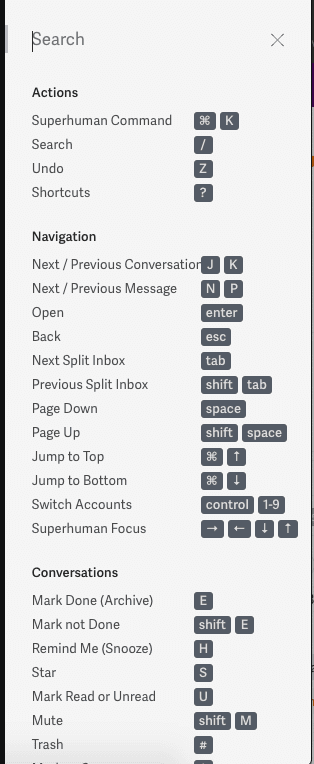
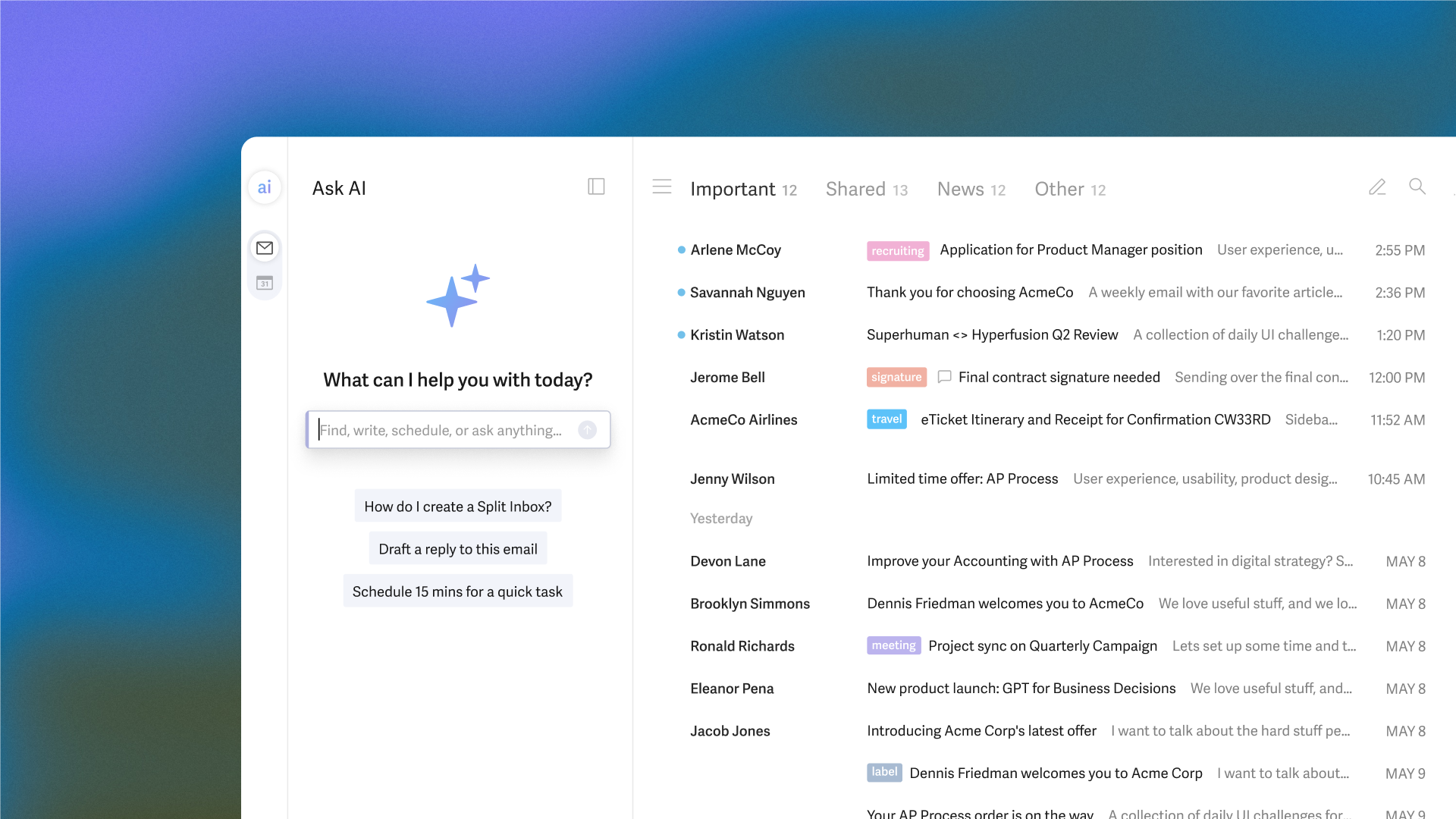
Superhuman launched back in 2015 as a speed demon for execs, but the AI infusion (amped up post-Grammarly buyout in mid-2025) turned it into a smart inbox ninja. It overlays your existing email without migrating a thing, secure, encrypted, and SOC 2 certified for the paranoid. The core? A distraction-free view where every action’s a keystroke away: Cmd+K for commands, J/K to zip through messages, E to archive. But the AI? That’s the 2025 glow-up. Feed it a prompt like “thank them for the deck and confirm Tuesday,” and it spits a polished draft in seconds, tweaking for tone (crisp pro or warm chatty). I tested it on a client nudge, nailed my casual vibe after I fed it a few old emails for “voice training.” No data hoarding either; OpenAI powers it but forgets after 30 days. For heavy hitters, it’s like having a ghostwriter who knows your shorthand, cutting draft time from 10 minutes to 30 seconds.
The interface? Clean as a fresh notebook, split inboxes for VIPs vs. noise, snippets for reusable bits (like “Looping in {team} for review”), and read receipts that actually tell you if your boss opened that urgent flag. Calendar sync’s seamless: Spot a meeting invite, and it pulls your slots, suggesting times across zones without the “when works?” ping-pong. Teams get shared threads for side-comments (no more CC clutter) and status pings to dodge double-replies. In my trial, a rambling 20-email client saga got auto-summarized into three bullets: “Key ask: Budget approval; Action: Review deck by Friday; Risks: Timeline slip.” Boom, triage done.
The Features That’ll Make You Feel Like a Superhero (With a Keyboard Cape)
Diving in, here’s what powered my productivity spike, straight from tests and tester tales, no fluff.
- Write with AI and Instant Reply: Prompt-to-draft magic for emails or quick hits. Highlight a thread, tap R, pick short/long, done. One reviewer clocked it halving response times on routine asks, like “Confirm details?” turning into “Yep, locked for 2pm EST, here’s the agenda.” Pro tip: Train it with your sent folder for spot-on tone; mine went from stiff to snappy after three samples.
- Auto Summarize and Ask AI: Condenses threads into scannable bites, pulling actions and dates. On Business plans, Ask AI queries your history (“Budget emails from Q3?”) with cited pulls, no app-switching. Saved me from a weekend deep-dive into old pitches; one zap, instant outline.
- Auto Schedule and Calendar Whiz: Spots invites, floats slots based on everyone’s calendars. Handles time zones like a pro, I set a cross-continent sync, and it proposed three options, gaps for buffers. Ties into Zoom/Meet for one-click joins.
- Keyboard Shortcuts and Snippets: The speed backbone, Cmd+Shift+M for summaries, custom snippets for boilerplate. G2 users (4.5/5 from 200+) rave: “Shortcuts alone justify the price; inbox zero in half the time.” Mobile app (iOS/Android) mirrors it, though lighter on AI.
- Team Tools and Labels: Shared convos for collab without forwards, auto-labels that tag “Client Wins” or “Follow-Ups” smartly. Business tier adds CRM hooks (Salesforce sync) and “Recent Opens” to chase ghosts.
From Nick Lafferty’s four-year spin, the concierge onboarding (that 30-min Zoom) was “like email MBA,” drilling shortcuts till they stuck. Highpolar testers noted AI prioritization learning your VIPs over weeks, bumping key threads up.
The Straight Talk: Highs That Soar, Lows That Sting
Superhuman’s a productivity rocket for inbox warriors, Techpoint’s three-week test on 80-120 emails/day called it a “grind-reducer,” with AI drafts feeling “eerily personal” and summaries slashing triage by 40%. Clean Email pros echo the clean UI and team collab, perfect for remote crews dodging email ping-pong. Security’s tight (no data sales, EU-safe), setup’s a breeze post-onboard, and updates roll weekly via changelog. For solos or small teams, it’s that “desert island” app, one user swore it’s worth ditching all else.
But let’s not gloss: At $30/month, it’s wallet-whiplash for casuals (three times Spark’s tab), and the waitlist/onboarding gatekeeps newbies. Gmail/Outlook only, no Yahoo wildcards, and AI’s not foolproof: Sarcasm flies over its head, summaries mash sub-threads, and drafts sometimes fluff up (Techpoint caught a “professional” rewrite killing casual charm). Learning curve bites if you’re shortcut-shy; Highpolar flagged it as “steep for non-power users.” No free trial (just demos), and mobile lags desktop depth. Vs. Shortwave (AI smarts at $10) or Thunderbird (free basics), Superhuman’s premium polish shines for volume, but overkill for 20-emails-a-day folks.
Pricing: Power Tools Come at Power Prices
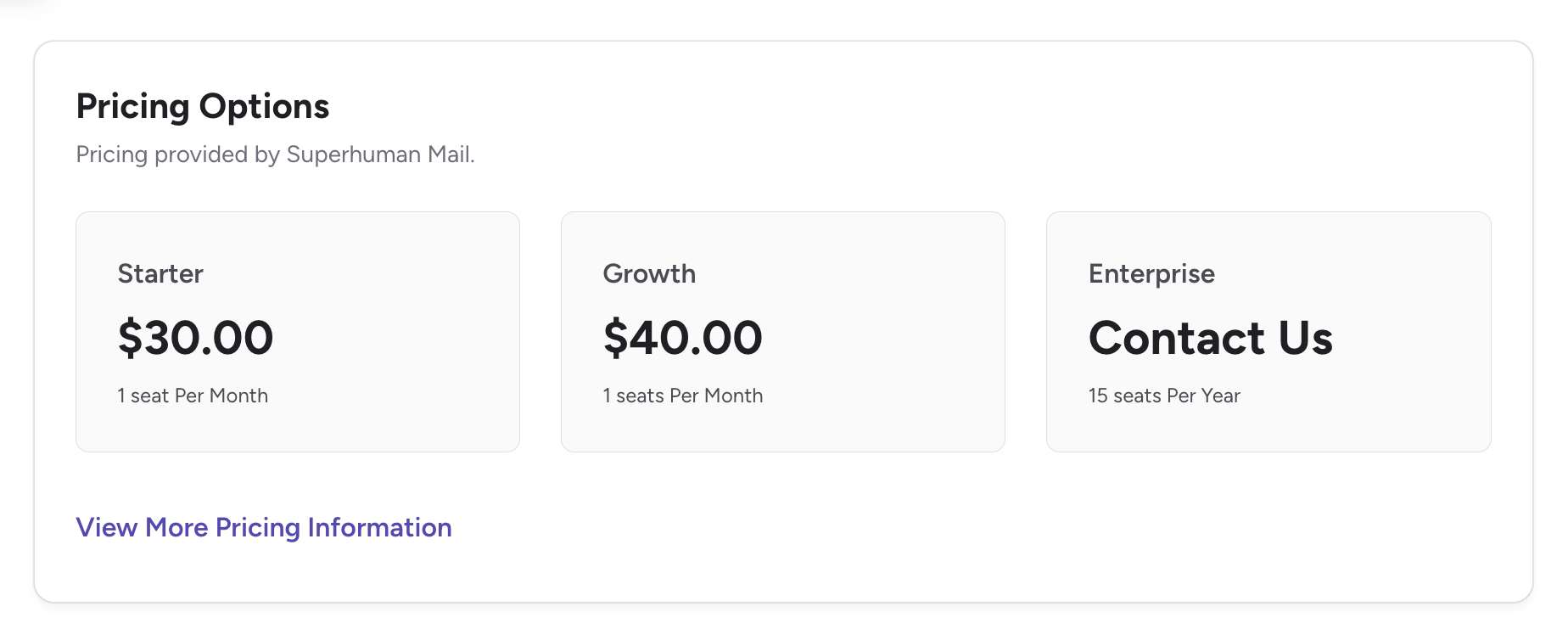
- Starter: $30/month ($25 annual), Core AI writes, summaries, shortcuts, team basics.
- Business: $40/month ($33 annual), Full Ask AI, CRM syncs, advanced labels.
- Enterprise: Custom, Analytics, SSO, VIP coaching.
Student deal: $10/month. ROI? If emails eat two hours weekly, it pays itself; else, test Gmail hacks first.
Who’s This Inbox Overlord For? (And Who Waves It Off)
Grab it if you’re an exec buried in 50+ dailies, a freelancer chasing client closes, or a team lead streamlining syncs, especially post-Grammarly, with deeper AI on the horizon. Skip for light users or budget hawks; Thunderbird + Clean Email nails 80% cheaper.
Final Verdict: 9.2/10, Your Email Escape Pod, If You Can Swing the Fuel
Superhuman won’t cure email aversion, but it’ll turbo it into a tool that works for you, not against, fast, smart, and slyly addictive once shortcuts click. Amid 2025’s AI email wars, it’s a leader for pros, docking points for cost and quirks. Request that invite, nail the onboarding, and watch your day expand. Worst? A fluffy draft delete. Best? Inbox zero by noon, coffee in hand.
What’s your email Achilles’ heel, drafts or digs? Spill; Superhuman might slay it.
About the Author