Ever sat through a marathon Zoom call, phone in one hand for frantic notes, the other fighting off the urge to mute and scream into a pillow? Last week, that was me, client brainstorming session dragging on, my “bullet points” turning into illegible hieroglyphs, and by the end I couldn’t tell you if we nailed the budget or just agreed to “think about pizza.” Enter Otter AI, the sneaky AI helper that’s been crashing meetings since 2016, turning audio chaos into searchable, shareable gold. It’s not some flawless oracle (spoiler: nothing is), but in my two-week spin it shaved a solid 45 minutes off my post-call cleanup by auto-joining, transcribing, and spitting out action items before I even closed the laptop. If you’re a freelancer juggling calls, a manager herding team syncs, or a student dodging lecture blackouts, here’s the real deal: Otter won’t replace your coffee-fueled recall, but it’ll free you to engage, spot trends across chats, and never again fake “yeah, I got that” emails. I’ll break down what works, what wobbles, and if it’s worth ditching your yellow pads for.
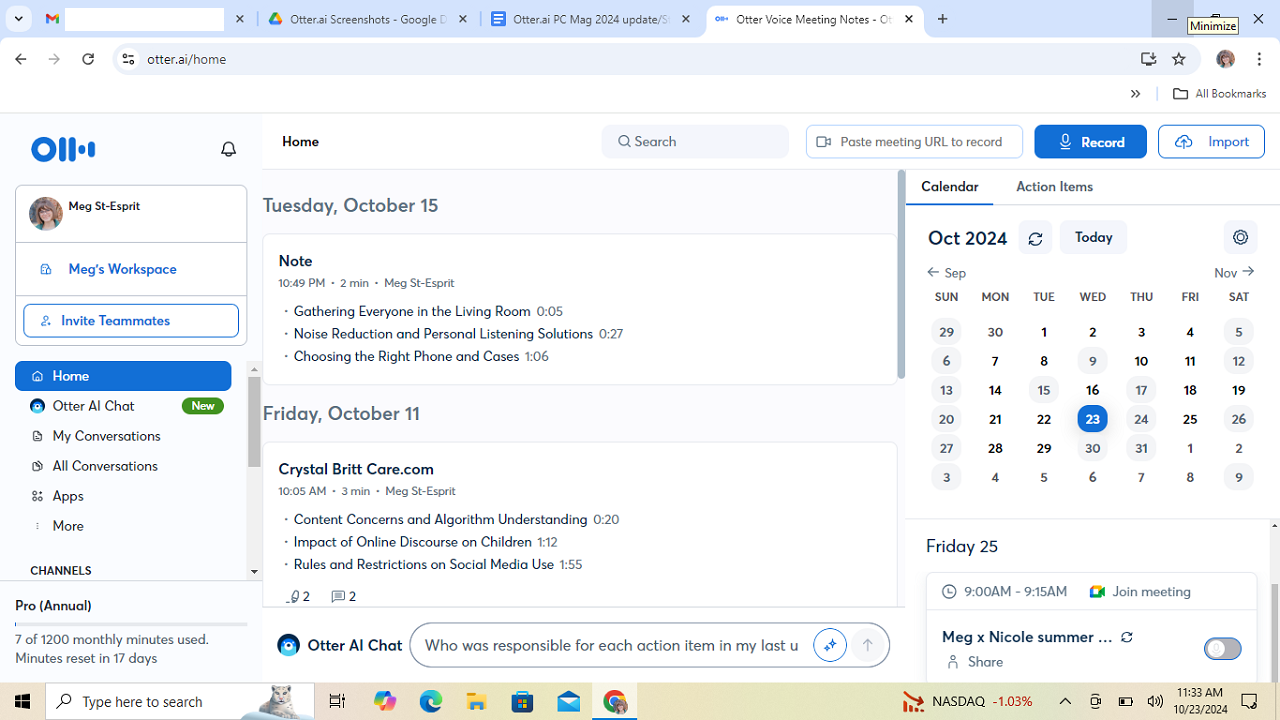
Otter started as a simple speech-to-text app but leveled up big-time by 2025, leaning on AI smarts to handle the full meeting mess, from joining uninvited (with your okay) to querying old transcripts like a personal archivist. Plug it into Zoom, Google Meet, or Teams, and OtterPilot (their bot) shows up, records audio, tags speakers, and builds a live transcript you can follow on your phone. No more “wait, who said what?”, just highlight a chunk, hit play, and hear the exact moment. I tested it on a 45-minute client huddle: 88% accurate in a quiet room with two native speakers, nailing most jargon after I added “SEO pivot” to custom vocab. But crank up background noise or accents, and it dips to 75%, swapping “et al.” for “it is” mid-rant. The AI Chat? Gold for fuzzy recalls, ask “what’s the Q4 timeline?” and it pulls quotes from three months back, no full re-listen needed. Mobile app’s a gem too: Record a solo brainstorm on your commute, sync it, and boom, editable text ready for Notion.
It’s versatile beyond Zooms, upload old podcasts (up to 10 files/month on Pro) or dictate ideas via voice memos, all searchable with keywords that light up like Christmas. Teams dig the shared folders for collab edits, where you can comment on a line (“Fix this stat?”) without emailing walls of text. And that summary magic? Post-call, it auto-builds outlines with bullets for decisions, risks, and to-dos, saved my butt on a rambling strategy sesh, turning 2,000 words into a one-page win.
The Features That’ll Make You Ditch Pen and Paper (Mostly)
Here’s the lineup that delivered in my tests, pulled from hands-on spins and what users are yapping about, no hype, just hits.
- Real-Time Transcription and Speaker Tags: OtterPilot dives in, transcribes as you talk (85-90% spot-on for clear English), labels “Sarah” vs. “Speaker 2” (hits 75% right, but glitches on overlaps). Pro tip: Train voiceprints upfront for your regulars, it cut my errors by 15%.
- AI Summaries and Action Nuggets: Auto-generates post-meeting recaps with key quotes, tasks, and highlights, way punchier than raw notes. In a test earnings call, it sifted buzzwords to flag “top releases,” skipping fluff. Chat mode amps it: “List objections” from a sales pitch? Instant bullets.
- Search and Playback Smarts: Keyword hunt across all your history (e.g., “budget pivot” pulls every hit), with one-click audio jumps. Editable transcripts link text to sound, click a wonky line, hear why “filing” became “failing,” fix on the fly.
- Integrations That Flow: Hooks into Slack for instant shares, Zapier for 7,000+ apps (auto-dump to Asana to-dos), and calendars to RSVP auto-joins. I pasted a Meet link, it grabbed slides, transcribed, and pinged my Drive, all in under a minute.
- Mobile and Custom Twists: iOS/Android apps mirror the web (4.5/5 on stores for ease), with offline record-then-sync. Add niche words like “blockchain fork” to vocab for 10% accuracy bumps in tech talks.
G2 crowds (4.1/5 from 900+) rave about the “stress-free focus,” with one agency head saying it “halved our recap time.” PCMag’s Editors’ Choice (4.5/5) echoes: “Outstanding for live audio, especially with OtterPilot’s real-time Q&A.”
The No-Sugarcoat: Bright Spots, Bumps, and Bail-Outs
Otter nails the basics with flair, CNET’s 8/10 calls it a “useful tool for messy transcripts,” perfect for English-heavy hustles where you value speed over perfection. Setup’s a snap (email sign-up, calendar link, done in 3 minutes), free tier’s generous (300 minutes/month beats Rev’s 45), and privacy’s decent, local-ish processing, two-factor auth, no data sales. Users on TrustRadius (7.6/10) love the collab vibe: “Editable shares cut our email chains by 50%.” For noisy cafes or quick interviews, the mobile recorder’s a lifesaver, syncing edits across devices.
But here’s the raw: Accuracy’s your wildcard, 83% average in Notta’s noisy tests, tanking to 60% with accents or crosstalk, forcing “good bit of cleaning” per CNET. Speaker ID flops 25% (Sonix tests: Musk interview swapped two for three), and no video means you miss visual cues for fixes. Language lock? English/Spanish/French only, manual switch, no auto-detect, so German chit-chat turns to gibberish. Free plan caps at 30 minutes/session (no rollovers), uploads sting at three lifetime, and OtterPilot’s pushy, joins “no” RSVPs, sparking privacy beefs (UMass banned it). Laggy feeds and no unlimited tier irk heavy users, Techpoint notes overlaps kill flow.
Head-to-head: Edges Fireflies on free minutes but trails tl;dv’s unlimited video/30+ languages (TLDV table: Otter lags on CRM syncs too). Notta’s 98% accuracy wins for globals, Sonix crushes multilingual at $5/hour pay-go. If accents or noise are your jam, peek Fathom, stealthier bot, better tags.
Pricing: Freemium Hook, But Watch the Minutes
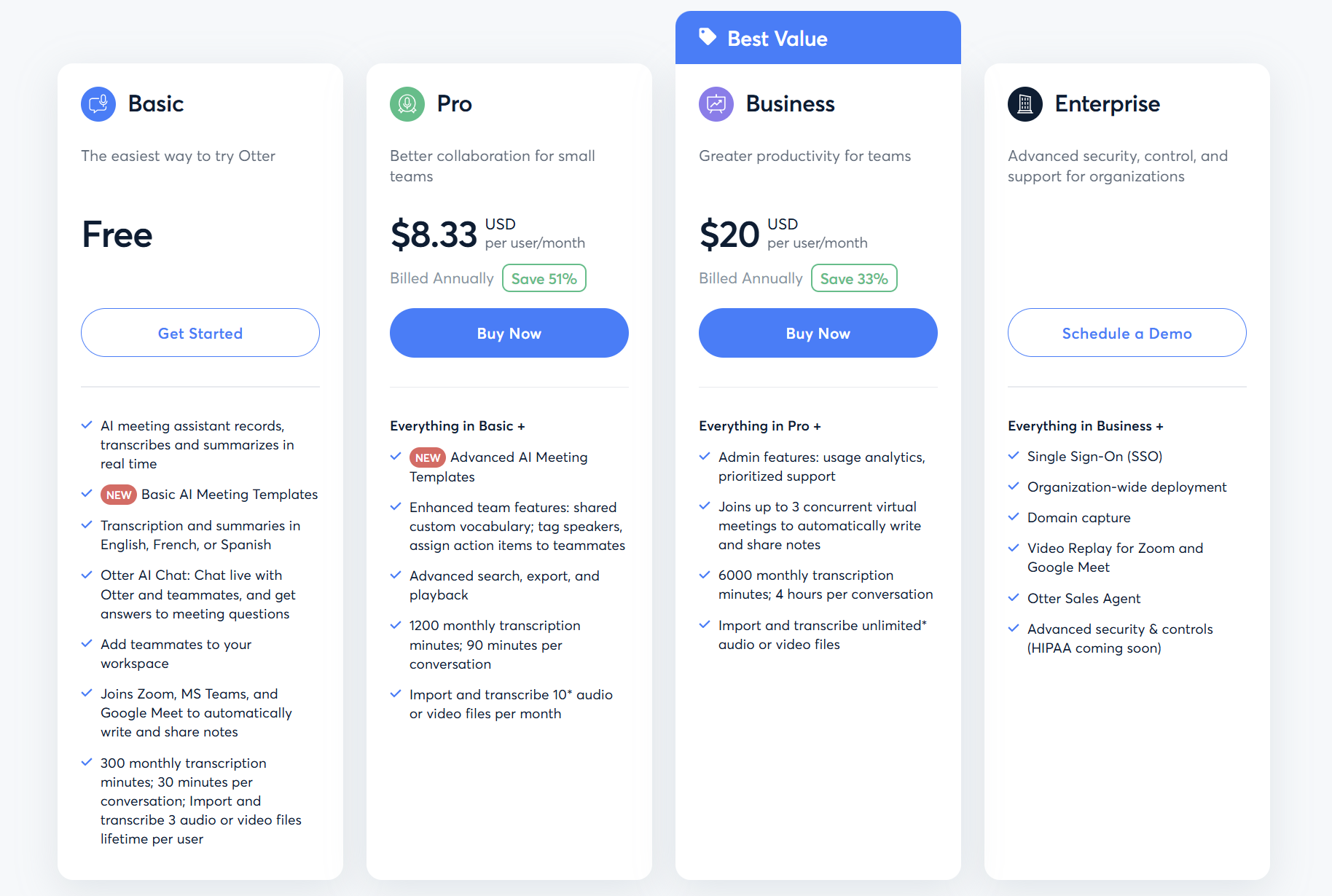
- Basic (Free): 300 minutes/month (30/session), OtterPilot for one meeting, basic chat, great toe-dip for solos.
- Pro: $8.33/month (annual), 1,200 minutes (90/session), 10 uploads, team shares.
- Business: $20/month (annual), 6,000 minutes (4 hours/session), unlimited uploads, analytics.
- Enterprise: Custom, SSO, video replay, full security.
Annual saves 50%, 14-day Pro trial (no card). ROI? One skipped recap pays it, casuals stick free, teams scale Business.
Who’s In? (And Who’s Gonna Ghost)
This shines for English-speaking pros in back-to-backs, freelancers recapping clients, teachers archiving lectures, sales reps mining calls for gems. Remote teams love the Slack zaps, students dig mobile memos. Bail if you’re multilingual (stick Notta), video-dependent (tl;dv), or accuracy-obsessed (Sonix), Otter’s “good enough” for drafts, not contracts.
Final Verdict: 8.2/10, Your Note-Taking Sidekick, Rough Edges and All
Otter won’t transcribe sonnets flawlessly, but it’ll hand you back the gift of presence, turning “lost in the weeds” into “nailing the close.” In 2025’s meeting apocalypse, it’s a reliable wingman, intuitive, integrated, and sneaky-smart once you tweak for your quirks. The accuracy dips and caps grate, but for $0 starters? It’s a no-brainer. Grab the freebie, join a test call, query a summary, and reclaim your focus. Worst case? A quirky transcript laugh. Best? Your next sync feels like a convo, not a chore.
What’s your wildest meeting mishap? Spill, Otter might transcribe the fix.
About the Author