
Ever stared at a blinking cursor in PowerPoint, wondering if your deck is secretly plotting against you? Yeah, me too. That soul-crushing moment when ideas swirl in your head but the screen stays stubbornly empty? It’s the bane of every marketer, teacher, or exec I’ve chatted with. Enter Gamma AI, this slick little tool that’s like having a caffeinated designer and writer on speed dial. In under five minutes, it can spit out a polished pitch deck, report, or even a mini-website from a rambling prompt like “Sell me on why remote work rocks.” No fluff, just results. And here’s the real value kicker right up front: if you’re churning out slides weekly, Gamma could slash your prep time by 80%, freeing you up for the stuff that actually moves the needle, like nailing that client call or grabbing an extra coffee. I’ve dug into half a dozen reviews and hands-on tests to break it down for you. Let’s see if it’s the game-changer it promises.
What the Heck Is Gamma, Anyway?
Picture this: Traditional tools like PowerPoint or Google Slides are like that reliable old pickup truck, they get you there, but good luck jazzing up the ride without a weekend of tinkering. Gamma flips the script. It’s an AI-powered creator that builds presentations, docs, and web pages on the fly, all from plain English. Launched a couple years back, it’s evolved into a beast with the latest Gamma 3.0 drop in September 2025, tossing in a “Gamma Agent” that reviews your deck like a nitpicky editor on steroids. Think scrollable, card-style layouts that feel more like a sleek TED Talk than a dusty slide show. No design degree required; just type your vibe, and boom, formatted text, charts, embeds, the works.
From what I’ve gathered, it’s web-based, so ditch the downloads. Works on your laptop, phone, whatever. And get this: it handles everything from sales pitches to lesson plans, even whipping up Instagram-ready posts or full sites with custom domains. One reviewer clocked 50+ decks in a frenzy, calling it “brutally efficient” for quick hits. If you’re in a crunch, say, prepping for a board meeting at 2 a.m. this is your midnight hero.
How It Actually Works (No PhD Needed)
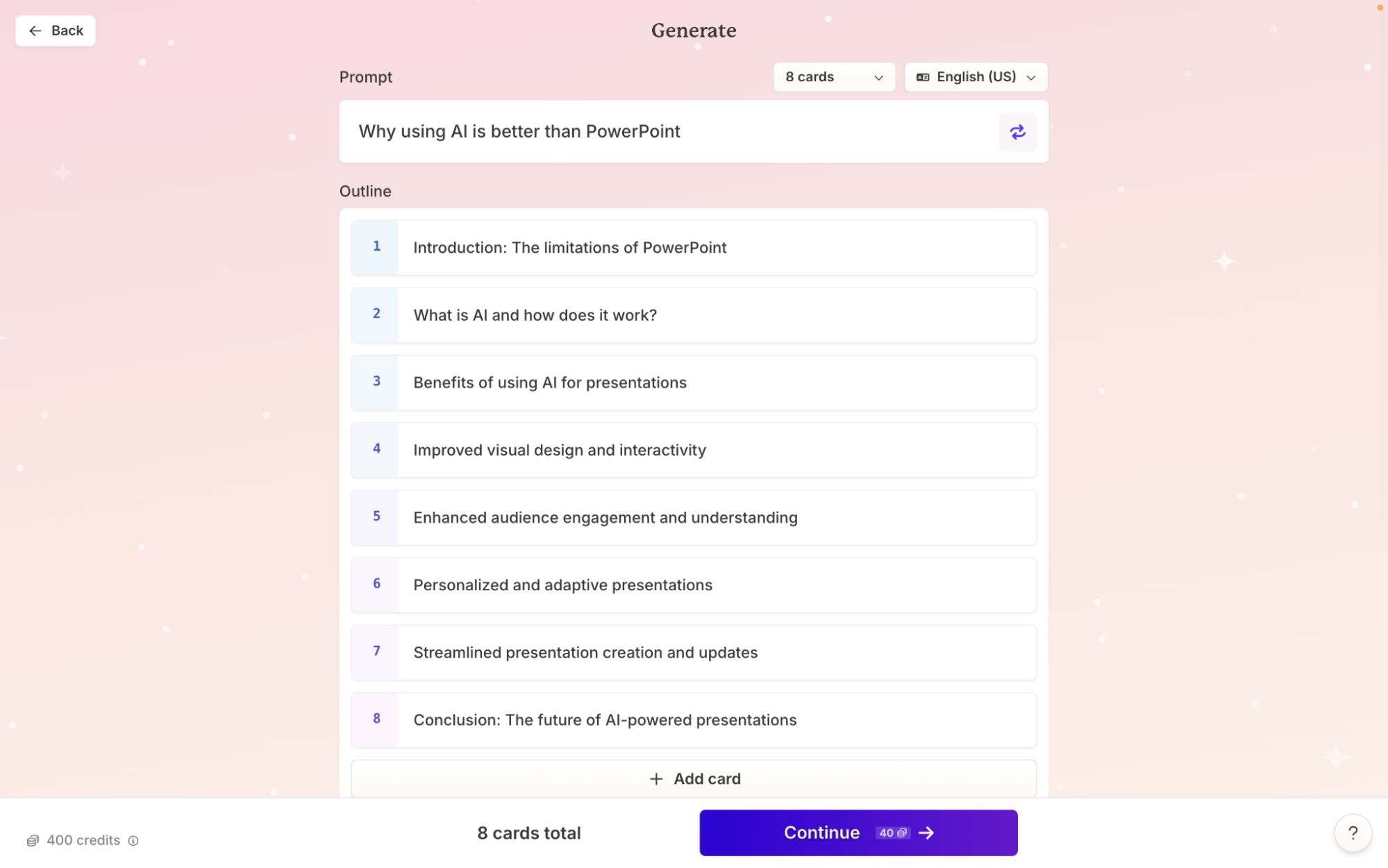
Alright, let’s walk through it like you’re right there with me, coffee in hand. Fire up gamma.app, hit “Create New,” and pick your poison: presentation, doc, or webpage. Now, the magic, drop in a prompt. Something meaty like: “Build a 10-card deck on AI’s job market shake-up, with stats, a timeline, and a poll on remote fears.” Hit generate, and in seconds (yeah, seconds), you’ve got a skeleton: headings, bullet bursts, suggested images from Unsplash or Giphy, even charts pulled from your prompt’s implied data.
But it’s not set-it-and-forget-it. Jump into the editor, drag-drop heaven. Tweak text with AI helpers: “Rephrase this to sound snappier” or “Condense to three bullets.” Swap layouts (timelines, icons, embeds, YouTube vids, Figma mocks, Loom recordings, you name it). Spotlight mode? Genius for live pitches; it blurs the background cards so your audience lasers in on this point. No more “Wait, which slide are we on?”
Export? PDF for that crisp printout, PPT for the old-school crowd (fair warning: fonts might shimmy a bit on import), or PNG stacks. Publish as a live link with analytics, track who lingered on your killer stat. Collaboration’s baked in too; invite the team for real-time edits or comments, no email ping-pong. One tester imported a URL from a blog and had a full recap deck ready to share, talk about lazy genius.
Pro tip for value: Start small. Use the free tier to test a one-pager on your next team update. You’ll see the time suck evaporate.
The Good, The Bad, and The “Eh, Fixable”
Let’s keep it real, Gamma’s not perfect, but man, does it shine in spots. Pros first: Speed is the star. Reviewers rave about churning out drafts in minutes, ditching the hours-long formatting grind. The visuals? Modern and mobile-friendly, with themes like “Sage” or “Coal” that shuffle for variety. AI image gen via DALL-E 3 or Flux is a highlight, upload a logo, tweak backgrounds, animate elements. Integrations galore: Google Drive, Figma, even PowerBI for data pulls. And that analytics dashboard? Views, engagement per card, gold for tweaking what lands.
Interactive bits like polls or quizzes make it pop for educators or salespeople. One blog tested it against PowerPoint for a corporate earnings report and found Gamma’s version more engaging, though it buried some numbers in text, fixable with edits. Collaboration feels seamless on paid plans, and the API (new in ’25) lets you automate workflows, like zapping ChatGPT outputs straight to a deck.
Now, the gripes, because every rose has thorns. Free plan’s stingy: 400 one-time credits (roughly 10 decks), then watermarks scream “Made with Gamma.” Themes are limited; if you’re craving Canva-level flair, it might feel basic. Exports to PPT can glitch layouts, and complex charts? Not its forte, stick to simple viz or embed from elsewhere. Customer support’s AI-only on free, and no animations yet, bummer for flashy keynotes. Plus, the editor’s feature flood can overwhelm newbies; it’s like a Swiss Army knife that nicks you if you’re not careful.
Overall, pros outweigh cons if you’re prompt-savvy. For nitpickers, it’s a solid 8/10, punches above in efficiency.
Pricing: Fair Shake or Wallet Workout?
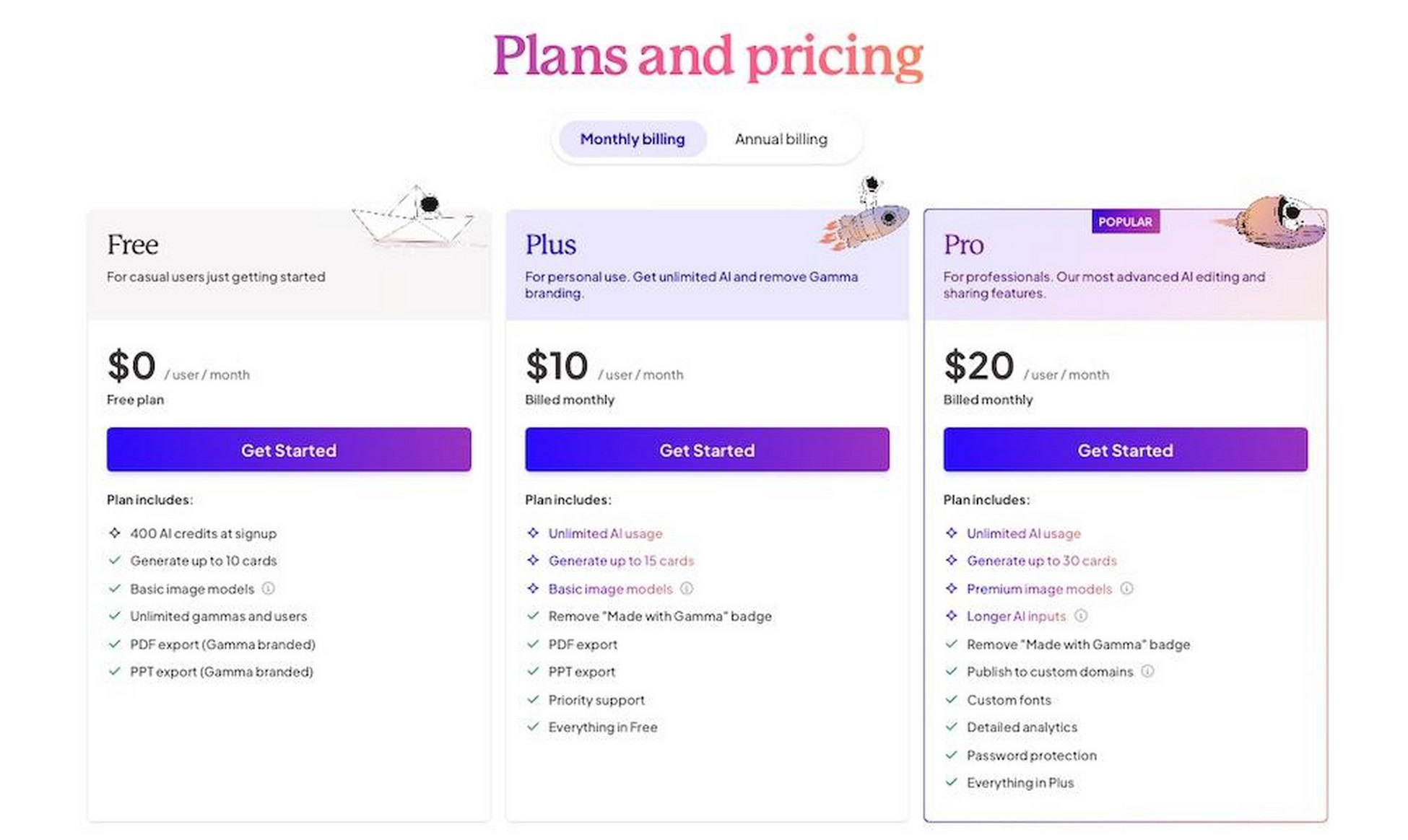
Gamma keeps it straightforward, no sneaky add-ons.
Free: $0, unlimited decks but capped credits and branding, perfect for dipping toes.
Plus: $10/month, unlocks unlimited AI, no watermarks, 20 cards/deck.
Pro: $20/month, amps it with premium images, analytics, 60 cards, API access. Team/Enterprise? Custom, with SSO and roles.
Value verdict: If you make 5+ decks a month, Plus pays for itself in saved sanity. 7-day refund, UPI for folks outside the US, thoughtful touch.
(For a peek at a Gamma deck in action, check this AI job market example from a reviewer’s test: AI and the Job Market Deck. It’s got timelines and polls that pop.)
Who Should Jump In? (And Who Should Pump the Brakes)
Gamma’s your jam if you’re a solopreneur hustling pitches, a teacher jazzing up lectures, or a marketer repurposing content fast. Students? Free tier’s a steal for group projects. Web folks love the site builder, one review spun a freelance portfolio in minutes. But if you’re deep in enterprise templates or need pixel-perfect PPT fidelity, maybe layer it with Google Slides as a hybrid.
Alternatives? Beautiful.ai for auto-design magic, Canva for endless templates (but less AI smarts). PowerPoint’s still king for offline tweaks, though Gamma’s pushing it toward retirement.
Wrapping It Up: Worth the Hype?
Short answer: Heck yes, especially if time’s your scarcest resource. Gamma isn’t here to replace your brain – it’s the accelerator that turns “meh” ideas into “wow” shares. I’ve seen it transform drudgery into delight across reviews, and after synthesizing these, I’m tempted to spin one up myself. Start free, prompt boldly, edit ruthlessly. Your next deck won’t thank me, but you will. What’s your biggest slide struggle? Drop it below – maybe Gamma’s got the fix.
About the Author